
Cabinee Enterprise / Community Distribution — DevOps Deployment Runbook
1. Purpose of this document
This document is intended for:
- DevOps engineers
- infrastructure engineers
- system administrators
The document describes:
- deploying Cabinee in Docker;
- connecting to external PostgreSQL, Kafka, Keycloak, and nginx;
- configuring Cabinee integration with external services;
- basic deployment validation.
This guide does not describe the installation of PostgreSQL, Kafka, Keycloak, or nginx. It is assumed that these services are already deployed and available.
2. Differences from the Community distribution installation guide
In this guide:
- PostgreSQL is external;
- Kafka is external;
- Keycloak is external;
- nginx is an external reverse proxy;
- Cabinee is deployed as a set of application containers.
Local Docker instances of PostgreSQL, Kafka, and Keycloak are not used.
Historical identifiers. Container names, image names, file paths (
generated/unibpm/…), SQL examples, Keycloak client IDs, and module names such asunibpm-camunda8-adaptermay still use theunibpm-*prefix. For Cabinee Community/Enterprise deployments, usecabinee-*container images from the Kazakhstan registry where available (see the Docker Compose example below).
3. System requirements
Canonical requirements, starting sizing profiles, and scaling limits are given in the System requirements and sizing section. Values from this runbook should not be used as a standalone sizing source.
3.1 Proven project configuration
The main backend is built and run on Java 17. Current deployments use PostgreSQL 16, Keycloak 26.x, Docker Engine 24.0.7 / Docker Compose 2.21.0, and Kubernetes 1.33.x.
Process engine composition:
| Engine | Components | Notes |
|---|---|---|
| Camunda 8 | orchestration cluster camunda/camunda 8.9.x, Elasticsearch 9.2.x, unibpm-camunda8-adapter, exporter inside the broker | The exporter is built for the same version as the broker; the orchestration cluster runs on Java 21 |
The Elasticsearch version is tied to Camunda: 8.9 requires Elasticsearch 9.2 or newer, while 8.8 worked on 8.16+. When upgrading Camunda, indexes are not migrated directly across major Elasticsearch versions.
These versions describe proven configurations and are not universal minimum supported versions. For a specific release, consult its release notes and pin agreed image tags. Kafka 2.3.0 is found on existing stands but is not recommended for new installations; the latest tag must not be used.
3.2 Resources before deployment
Before start-up, select a starting profile in the canonical section, calculate PostgreSQL and Kafka storage separately, and set CPU/RAM limits and an explicit JVM heap. For production, recommendations must be confirmed by a load test on the customer’s processes, data, and integrations.
4. DNS and TLS requirements
4.1 DNS
Required DNS records:
uni.company.com
id.company.com
Optional:
camunda.company.com
All DNS records must point to the reverse proxy/nginx.
4.2 TLS
HTTPS is recommended.
Requirements:
- TLS termination on nginx;
- a correct reverse proxy;
- valid certificates;
- WebSocket proxying support.
Supported:
- Let’s Encrypt;
- corporate certificates.
4.3 Network connections and ports
Inbound connections
| Component | Port | Purpose |
|---|---|---|
| nginx | 443 | HTTPS ingress |
| nginx | 80 | HTTP → HTTPS redirect |
Cabinee outbound connections
| Source | Destination | Port | Purpose |
|---|---|---|---|
cabinee-app (unibpm-app) | PostgreSQL | 5432 | connection to the Cabinee database |
| cabinee-app | Kafka | 9092/9093 | Kafka integration |
| cabinee-app | Keycloak | 443 | OAuth2 authentication |
| nginx | cabinee-frontend (unibpm-frontend) | 80 | frontend reverse proxy |
Process engine components:
| Source | Destination | Port | Purpose |
|---|---|---|---|
cabinee-app (unibpm-app) | orchestration cluster | 8080 | Camunda 8 REST API v2 |
| camunda (exporter inside the broker) | Kafka | 9092/9093 | publishing the engine record stream |
| camunda | Elasticsearch | 9200 | built-in exporter to secondary storage |
unibpm-camunda8-adapter | Kafka | 9092/9093 | reading records and publishing events |
unibpm-camunda8-adapter | PostgreSQL | 5432 | businessKey mapping table |
Cabinee container ports
| Component | Internal port | Note |
|---|---|---|
cabinee-app (unibpm-app) | 8099 | |
cabinee-frontend (unibpm-frontend) | 80 |
Process engine components:
| Component | Internal port | Purpose |
|---|---|---|
| camunda | 8080 | REST API v2, Operate, Tasklist |
| camunda | 26500 | Zeebe gRPC gateway |
| camunda | 9600 | broker management endpoints |
| elasticsearch | 9200 | secondary storage |
unibpm-camunda8-adapter | 8090 | actuator; 8080 is used by the orchestration cluster |
When using a Docker bridge network, publishing internal ports externally is usually not required.
It is recommended to expose only nginx externally. Do not expose Operate and Tasklist of the orchestration cluster externally.
Health checks
| Component | Check |
|---|---|
cabinee-app (unibpm-app) | GET /actuator/health |
| camunda | GET http://<host>:8080/v2/topology — 200 means the cluster has formed |
| elasticsearch | GET http://<host>:9200/_cluster/health, status green or yellow |
unibpm-camunda8-adapter | GET http://<host>:8090/actuator/health; liveness and readiness probes are enabled |
Additionally, after start-up verify that the exporter loaded into the broker:
docker logs <camunda-container> 2>&1 | grep -i "UniBPM exporter"
Expected lines: UniBPM exporter configured and UniBPM exporter opened. Their absence means the record stream is not going to Kafka and tickets will not change state.
5. External dependencies
5.1 PostgreSQL
Requirements
- PostgreSQL 15+;
- UTF-8 encoding;
- TCP access;
- a database for Cabinee and a schema for
unibpm-camunda8-adapter.
Creating users
SQL examples below use the historical database user name
unibpm. For new Cabinee installations you may create acabineeuser instead.
CREATE USER unibpm WITH PASSWORD '<strong_password>';
Creating databases
CREATE DATABASE unibpm OWNER unibpm;
There is no separate process-engine database: runtime is stored in RocksDB inside the broker, and search data is in Elasticsearch. Only a schema for unibpm-camunda8-adapter is needed, where it maintains the process-instance ↔ ticket mapping:
CREATE SCHEMA IF NOT EXISTS camunda8_adapter;

CREATE TABLE IF NOT EXISTS camunda8_adapter.business_key_mapping
(
    process_instance_key        VARCHAR(32)  NOT NULL,
    business_key                VARCHAR(255) NOT NULL,
    parent_process_instance_key VARCHAR(32),
    tenant_id                   VARCHAR(64),
    bpmn_process_id             VARCHAR(255),
    created_at                  TIMESTAMPTZ  NOT NULL DEFAULT now(),
    updated_at                  TIMESTAMPTZ  NOT NULL DEFAULT now(),
    CONSTRAINT pk_business_key_mapping PRIMARY KEY (process_instance_key)
);

CREATE INDEX IF NOT EXISTS ix_business_key_mapping_business_key
    ON camunda8_adapter.business_key_mapping (business_key);

CREATE INDEX IF NOT EXISTS ix_business_key_mapping_parent
    ON camunda8_adapter.business_key_mapping (parent_process_instance_key)
    WHERE parent_process_instance_key IS NOT NULL;

CREATE INDEX IF NOT EXISTS ix_business_key_mapping_updated_at
    ON camunda8_adapter.business_key_mapping (updated_at);
A ready script is in the repository: unibpm-app/docker/camunda8-dev/postgres/init/02c-business-key-mapping-in-unibpm-db.sql (schema inside the unibpm database) and 02-camunda8-adapter.sql (separate database variant).
The schema may live in a separate database or inside the Cabinee/unibpm database — the adapter addresses it by fully qualified name. Inside the Cabinee database it is safer: resetting Liquibase changelogs does not affect it, because the schema is not public and is not managed by Liquibase. The adapter has ddl-auto set to none, so it does not create the table itself.
Credentials are set with ADAPTER_DB_URL, ADAPTER_DB_USERNAME, ADAPTER_DB_PASSWORD; pool size is ADAPTER_DB_POOL_SIZE (default 16) and should be aligned with spring.kafka.listener.concurrency.
Privileges for the unibpm database
\c unibpm

GRANT ALL PRIVILEGES ON DATABASE unibpm TO unibpm;
GRANT USAGE, CREATE ON SCHEMA public TO unibpm;
GRANT ALL PRIVILEGES ON ALL TABLES IN SCHEMA public TO unibpm;
GRANT ALL PRIVILEGES ON ALL SEQUENCES IN SCHEMA public TO unibpm;
Privileges for the adapter schema
\c unibpm

GRANT USAGE ON SCHEMA camunda8_adapter TO unibpm;
GRANT ALL PRIVILEGES ON ALL TABLES IN SCHEMA camunda8_adapter TO unibpm;
GRANT ALL PRIVILEGES ON ALL SEQUENCES IN SCHEMA camunda8_adapter TO unibpm;
Cabinee configuration
File:
generated/unibpm/application.yaml
spring:
  datasource:
    url: jdbc:postgresql://postgres.company.com:5432/unibpm
    username: unibpm
    password: ${UNIBPM_DB_PASSWORD}
Camunda 8 Adapter configuration
Connection is set with container environment variables:
ADAPTER_DB_URL=jdbc:postgresql://postgres.company.com:5432/unibpm?currentSchema=camunda8_adapter
ADAPTER_DB_USERNAME=unibpm
ADAPTER_DB_PASSWORD=${UNIBPM_DB_PASSWORD}
ADAPTER_DB_POOL_SIZE=16
The orchestration cluster does not need PostgreSQL: runtime is in RocksDB, search data is in Elasticsearch.
5.2 Kafka
Requirements
Supported:
- single-node Kafka;
- multi-node Kafka cluster.
Recommended:
- replication.factor >= 3 for production;
- min.insync.replicas >= 2;
- retention according to company requirements.
Topics
Main topics are created by the application automatically.
Event topics:
| Topic | Producer | Consumer |
|---|---|---|
reunico.unibpm.task.events.prod | unibpm-camunda8-adapter | unibpm-app |
reunico.unibpm.execution.events.prod | unibpm-camunda8-adapter | unibpm-app |
Engine record stream topic:
| Topic | Producer | Consumer |
|---|---|---|
reunico.unibpm.c8.records | exporter inside the broker | unibpm-camunda8-adapter |
The entire engine record stream goes through this topic, so volume is substantially higher than on the others: record types PROCESS_INSTANCE, USER_TASK, VARIABLE, INCIDENT, and JOB are exported. Set retention deliberately.
External-task topics are created when the jobs worker is enabled:
reunico.unibpm.external-task.jobs.<taskType>.prod
reunico.unibpm.external-task.results
reunico.unibpm.external-task.dlq
All topic names must match in producer and consumer configuration. A mismatch between unibpm.camunda8.change-state-topic on the adapter and camunda-kafka-import.change-state-topic on unibpm-app fails silently: the adapter publishes to a topic nobody reads, and tickets simply do not change state.
If auto topic creation is disabled, create topics manually.
Cabinee configuration
File:
generated/unibpm/application.yaml
spring:
  kafka:
    bootstrap-servers: kafka.company.com:9092
Kafka with SASL/SSL
spring:
  kafka:
    bootstrap-servers: kafka.company.com:9093
    properties:
      security.protocol: SASL_SSL
      sasl.mechanism: SCRAM-SHA-512
      sasl.jaas.config: >
        org.apache.kafka.common.security.scram.ScramLoginModule required
        username="${KAFKA_USERNAME}"
        password="${KAFKA_PASSWORD}";
5.3 Keycloak
Requirements
- Keycloak 26.x;
- HTTPS access.
Required clients
| Client | Purpose |
|---|---|
cabinee-app (unibpm-app) | backend OAuth2 client |
cabinee-frontend (unibpm-front) | frontend authentication |
| camunda8 | unibpm-app access to the orchestration cluster REST API v2 |
A separate client is required for REST API v2. Its name is set by camunda-eight-client.oauth2-registration-id (default camunda8) and must match an entry in spring.security.oauth2.client.registration.*:
spring:
  security:
    oauth2:
      client:
        registration:
          camunda8:
            client-id: ${CAMUNDA8_CLIENT_ID}
            client-secret: ${CAMUNDA8_CLIENT_SECRET}
            authorization-grant-type: client_credentials
            provider: keycloak
            scope: openid
Two notes about this client.
The registration is resolved at request time, not at application start. If it is missing, the application starts normally and fails on the first engine call with Could not find ClientRegistration with id 'camunda8'.
The orchestration cluster itself must accept these tokens. If it is started with CAMUNDA_SECURITY_AUTHENTICATION_UNPROTECTEDAPI=true, the token is ignored — in that case a separate client is not needed; set camunda-eight-client.oauth2-enabled: false.
Client types
Recommended types:
| Client | Type |
|---|---|
cabinee-app (unibpm-app) | confidential |
| camunda8 | confidential |
cabinee-frontend (unibpm-front) | public |
Client secrets
Obtaining secrets:
Realm
  → Clients
  → <client>
  → Credentials
  → Client secret
Cabinee configuration
File:
generated/unibpm/application.yaml
identity:
  keycloak:
    base-url: https://id.company.com
    realm: unibpm
OAuth2 configuration
spring:
  security:
    oauth2:
      client:
        registration:
          unibpm-keycloak:
            client-id: unibpm-app
            client-secret: ${UNIBPM_APP_SECRET}
            authorization-grant-type: client_credentials

          camunda8:
            client-id: ${CAMUNDA8_CLIENT_ID}
            client-secret: ${CAMUNDA8_CLIENT_SECRET}
            authorization-grant-type: client_credentials
            provider: unibpm-keycloak
            scope: openid

        provider:
          unibpm-keycloak:
            token-uri: https://id.company.com/realms/unibpm/protocol/openid-connect/token
5.4 nginx
Requirements
nginx is used as a reverse proxy.
Requirements:
- HTTPS termination;
- WebSocket support;
- proxy headers;
- large request support.
nginx configuration example
server {
    listen 443 ssl;
    server_name uni.company.com;

    ssl_certificate /etc/nginx/certs/fullchain.pem;
    ssl_certificate_key /etc/nginx/certs/privkey.pem;

    location / {
        proxy_pass http://unibpm-frontend:80;

        proxy_set_header Host $host;
        proxy_set_header X-Forwarded-Proto https;
        proxy_set_header X-Forwarded-For $proxy_add_x_forwarded_for;
        proxy_read_timeout 300;
        proxy_connect_timeout 300;
        proxy_http_version 1.1;
        proxy_set_header Upgrade $http_upgrade;
        proxy_set_header Connection "upgrade";
    }
}
6. Components to install
The following containers are deployed:
| Component | Purpose |
|---|---|
cabinee-app (unibpm-app) | backend API |
cabinee-frontend (unibpm-frontend) | frontend UI |
| camunda | Camunda 8 orchestration cluster with the Cabinee exporter (unibpm-camunda8-exporter) inside the broker |
| elasticsearch | secondary storage for the orchestration cluster |
unibpm-camunda8-adapter | converts engine records into ticket and task events |
Docker Compose example
version: '3.9'

services:
  cabinee-app:
    image: cr.yandexcloud.kz/crkus9to5u5p49kovldl/cabinee-app:1.0.5
    platform: linux/amd64
    volumes:
      - ./generated/unibpm/application.yaml:/config/application.yaml:ro
    env_file:
      - .env
    ports:
      - "${BACKEND_PUBLIC_PORT:-8099}:8099"
    networks:
      - cabinee
    restart: unless-stopped

  elasticsearch:
    image: docker.elastic.co/elasticsearch/elasticsearch:${ELASTIC_VERSION}
    environment:
      discovery.type: single-node
      xpack.security.enabled: "false"
    volumes:
      - elasticsearch-data:/usr/share/elasticsearch/data
    networks:
      - cabinee
    restart: unless-stopped

  camunda:
    image: camunda/camunda:${CAMUNDA_VERSION}
    volumes:
      # Directory, not a single file: binding one file is unreliable.
      # Place the exporter JAR in ./exporters.
      - ./exporters:/usr/local/camunda/exporters:ro
    environment:
      SPRING_PROFILES_ACTIVE: broker,operate,tasklist,identity
      CAMUNDA_DATA_SECONDARYSTORAGE_TYPE: elasticsearch
      CAMUNDA_DATA_SECONDARYSTORAGE_ELASTICSEARCH_URL: http://elasticsearch:9200
      ZEEBE_BROKER_EXPORTERS_UNIBPM_CLASSNAME: com.reunico.unibpm.camunda8.exporter.UniBpmExporter
      ZEEBE_BROKER_EXPORTERS_UNIBPM_JARPATH: /usr/local/camunda/exporters/unibpm-camunda8-exporter.jar
      ZEEBE_BROKER_EXPORTERS_UNIBPM_ARGS_BOOTSTRAPSERVERS: ${KAFKA_BOOTSTRAP_SERVERS}
      ZEEBE_BROKER_EXPORTERS_UNIBPM_ARGS_TOPIC: ${C8_RECORDS_TOPIC}
    depends_on:
      - elasticsearch
    ports:
      - "${CAMUNDA_PUBLIC_PORT:-8081}:8080"
      - "26500:26500"
    networks:
      - cabinee
    restart: unless-stopped

  unibpm-camunda8-adapter:
    image: registry.reunico.com/reunico/unibpm/unibpm-camunda8-adapter:${ADAPTER_IMAGE_TAG}
    env_file:
      - .env
    depends_on:
      - camunda
    ports:
      - "${ADAPTER_PUBLIC_PORT:-8090}:8090"
    networks:
      - cabinee
    restart: unless-stopped

  cabinee-frontend:
    image: cr.yandexcloud.kz/crkus9to5u5p49kovldl/cabinee-frontend:1.0.5
    platform: linux/amd64
    depends_on:
      - cabinee-app
    ports:
      - "${FRONT_PUBLIC_PORT:-8080}:80"
    networks:
      - cabinee
    restart: unless-stopped

volumes:
  elasticsearch-data:

networks:
  cabinee:
    driver: bridge
The exporter version must match the broker minor version: it is loaded into the broker JVM and the broker will not start if the API diverges.
Unlike the Community compose, this variant has no PostgreSQL, Kafka, Keycloak, nginx, or certbot containers.
7. Environment variables
Required secrets
UNIBPM_DB_PASSWORD
UNIBPM_APP_SECRET
CAMUNDA8_CLIENT_ID
CAMUNDA8_CLIENT_SECRET
KAFKA_USERNAME
KAFKA_PASSWORD
Secrets must not be stored in Git.
Recommended options:
- Vault;
- Kubernetes Secrets;
- Docker Secrets;
- CI/CD variables.
8. Validation / Smoke Test
UI availability check
Open:
https://uni.company.com
Expected result:
- the frontend opens;
- redirect to Keycloak occurs;
- authentication succeeds.
Kafka check
Check logs:
docker compose logs -f cabinee-app
Logs must not contain:
Bootstrap broker disconnected
TimeoutException
Topic not found
Keycloak check
Check token retrieval:
curl -i -X POST "https://id.company.com/realms/unibpm/protocol/openid-connect/token" \
  -H "Content-Type: application/x-www-form-urlencoded" \
  --data-urlencode "grant_type=client_credentials" \
  --data-urlencode "client_id=${CAMUNDA8_CLIENT_ID}" \
  --data-urlencode "client_secret=<secret>"
Expected result:
HTTP 200
access_token
PostgreSQL check
Verify that migrations complete successfully.
Logs must not contain:
permission denied
no schema has been selected
relation does not exist
Backend health endpoint check
curl http://localhost:8099/actuator/health
Expected result:
{"status":"UP"}
Orchestration cluster health check
curl http://localhost:8080/v2/topology
Expected result: HTTP 200 and a topology payload.
Health endpoints are recommended for:
- readiness probes;
- liveness probes;
- monitoring;
- external load balancer health checks.
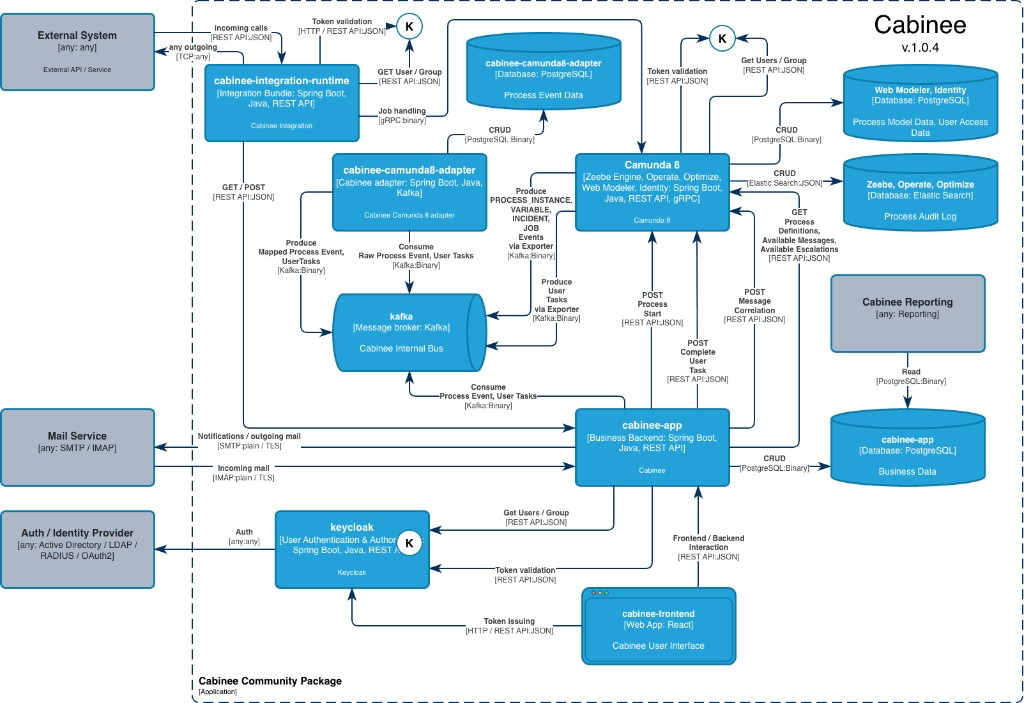
9. Architecture diagram
10. Troubleshooting
401 Unauthorized
Cause:
- incorrect client secret;
- incorrect realm;
- incorrect token-uri.
403 Forbidden
Cause:
- missing role:
realm-management → realm-admin
Kafka connection errors
Cause:
- incorrect bootstrap server;
- firewall;
- SASL misconfiguration.
PostgreSQL schema errors
Cause:
- missing privileges on schema public.
11. Summary
After following this guide:
- the Cabinee frontend is available through nginx;
- the backend successfully connects to PostgreSQL;
- the backend successfully connects to Kafka;
- OAuth2 authentication goes through external Keycloak;
- Camunda 8 is integrated (REST API v2, exporter, adapter);
- the smoke test completes successfully.