
System requirements and sizing
Purpose
This page is intended for architects, DevOps engineers, and customers who are planning Cabinee infrastructure.
The configurations below are starting guidelines, not guaranteed performance limits. Final sizing is determined by peak process, user, API, and integration load, data volume, and retention periods.
Architecture and calculation boundaries
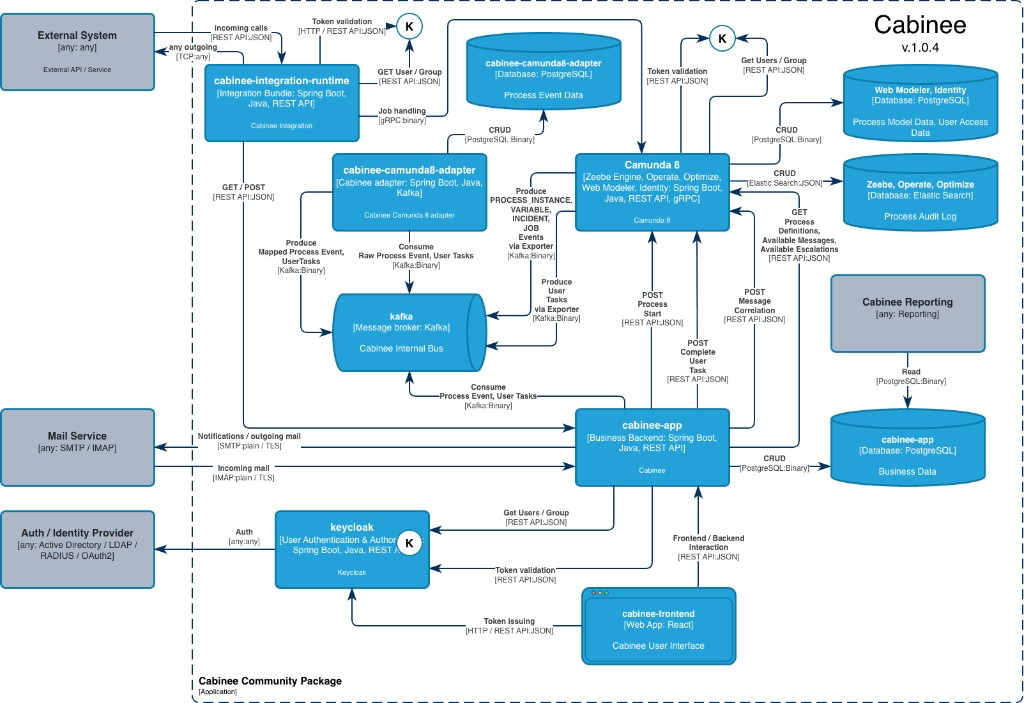
User requests pass through the public access layer to the Frontend and Application API. External systems can interact with the public API or Integration Runtime, and event exchange between components is performed through Kafka.
The application layer consists of separate components: Frontend, Application API, Process Engine, and, when used, Integration Runtime. Application API and Process Engine have different load profiles and separate logical PostgreSQL stores for Business Data and Process Data.
PostgreSQL, Kafka, and the Identity Provider can be deployed inside the Cabinee perimeter or provided by an external platform. If they are not included in the selected deployment profile, their resources are estimated separately. Resources for an external AI provider and local AI models are also outside the baseline profiles.
Minimum system requirements
The minimum configuration is intended for evaluation, demo, and functional testing without high-availability requirements.
| Parameter | Minimum value | Comment |
|---|---|---|
| CPU | 4 vCPU | Starting application-layer resource for a small test environment |
| RAM | 8 GiB | When dependencies are co-located, their resources must be counted separately |
| Disk | from 40 GiB SSD | Without long-term storage of attachments, history, and backup |
| PostgreSQL | PostgreSQL 16 | Application and process data; may be provided as an external service |
| Kafka | Version supported by Cabinee | Event exchange service; may be provided as an external service |
| Identity Provider | Compatible identity service | May be in-perimeter or provided by an external platform |
| Java | Java 17 | For Application API and Process Engine |
Recommended starting profiles
| Profile | Registered users | Concurrent activity | Application CPU | Application RAM | Runtime disk | Purpose |
|---|---|---|---|---|---|---|
| Demo | up to 20–30 | typically up to 10–15 | 4 vCPU | 8 GiB | from 40 GiB SSD | Demonstration and functional verification |
| Pilot | up to 50–100 | approximately up to 20–40 | 4–8 vCPU | 12–16 GiB | from 80 GiB SSD | Pilot with a limited number of processes and integrations |
| Production Small | up to 200–300 | approximately up to 50–100 | 8 vCPU | 16–32 GiB | from 100 GiB SSD | Starting production profile under moderate load |
| Production Medium | up to 1000 | approximately up to 150–400 | 16–32 vCPU in total | 32–64 GiB in total | from 200 GiB SSD with room to grow | Several processes and integrations with pronounced peaks |
| Enterprise | more than 1000, or high process, API, integration, or AI load | according to the load profile | according to the load test | according to the load test | according to the capacity plan | Individual capacity plan and representative load test |
CPU and RAM apply only to the application layer. Selecting a row by user count is not sufficient: the profile must also be checked against process steps/second, API_peak, payload size, attachments, and retention.
For Enterprise, infrastructure, HA/DR, RPO/RTO, and platform-service resources are determined by the customer architecture and confirmed by a separate capacity plan.
How to estimate the load profile
First fill in the sizing worksheet for a real peak period. A daily average does not replace the peak-window profile.
| Parameter | What to measure |
|---|---|
U | Registered users |
C | Concurrently active users in the peak period |
P_day | Process instances on a peak day |
A | Average number of executable steps per process instance |
T_day | User tasks on a peak day |
API_peak | API requests per second in the peak window |
S_var | Average and typical maximum process variable volume |
F_day | Number of attachments per day |
S_file | Average and typical maximum attachment size |
R_process | Process history retention period |
R_file | Attachment retention period |
AI_peak | Concurrent AI requests |
K | Peak factor relative to load within the peak window |
Process load
process steps/day = P_day × A

process steps/second = (P_day × A × K) / peak_window_seconds
peak_window_seconds is the duration of the real peak window. Load must not be spread evenly over 24 hours if the bulk of operations runs within 8–12 hours. The coefficient K is chosen from expected bursts and then refined from metrics.
User tasks
human tasks/second = (T_day × K) / peak_window_seconds
The C parameter additionally affects the number of parallel HTTP/WebSocket connections, concurrent API requests, and connection pools.
API load
If the actual or forecast API_peak is known, use it directly. If only daily volume is known:
API requests/second = (API_requests_day × K) / peak_window_seconds
For integrations, also account for payload, timeout, retries, concurrency, and external-system limits.
Attachments
attachment data in retention period =
    F_day × S_file × business_days_per_year × retention_years

required attachment storage =
    attachment data in retention period × reserve_factor
The reserve covers growth, indexes, service data, and operational headroom. Backup is calculated separately according to the adopted retention policy.
In the current product configuration, attachments may be stored in PostgreSQL, so their volume significantly affects database size, IOPS, and backup and restore time. reserve_factor is refined from actual data growth.
Process data
Do not use a universal “bytes per process” coefficient: size depends on BPMN models, number of tasks, variables, and history.
A safe estimation approach:
- measure database growth on a test stand over a selected period;
- correlate the growth with the number of created process instances and tasks;
- adjust the result for
R_process; - apply a reserve;
- confirm the calculation with a load test.
estimated process storage =
    measured average storage per process instance
    × process instances in retention period
    × reserve_factor
measured average storage per process instance is determined on representative BPMN models with typical variables and payload.
AI load
AI features are estimated from AI_peak, context size, selected model, latency, and rate limits — not only from user count.
With an external AI provider, the bulk of computation runs outside the application layer, but Cabinee still uses resources for context preparation, network connections, and response processing. For a local model, GPU, CPU, RAM, and storage are calculated separately and are not part of the Cabinee baseline profiles.
Calculation example
Source profile:
| Parameter | Value |
|---|---|
| Registered users | 300 |
| Concurrently active users | 80 |
P_day | 10,000 process instances |
A | 12 steps |
T_day | 2,000 tasks |
| Peak window | 8 hours = 28,800 seconds |
K | 3 |
F_day | 100 attachments |
S_file | 2 MiB |
R_file | 1 year |
Calculation:
process steps/day = 10 000 × 12 = 120 000

process steps/second = 120 000 × 3 / 28 800 = 12.5

human tasks/second = 2 000 × 3 / 28 800 ≈ 0.21

attachment data = 100 × 2 MiB × 250 working days
                = 50 000 MiB ≈ 48.8 GiB per year
Attachment volume is given without backup, indexes, and reserve. For a system that operates on every calendar day, use the actual number of working days in the year instead of 250.
The result is not a performance promise. It is used to choose a starting profile, which is then verified with a load test using real BPMN models, payload, integrations, and the attachment profile.
Applicability limits
- values are starting guidelines, not guaranteed capacity;
- resources of external PostgreSQL, Kafka, Identity Provider, AI provider, and monitoring are estimated separately;
- attachments, retention, payload, and peak load can change sizing substantially;
- production sizing is confirmed by a representative load test.
Scaling
| Component | Horizontal scaling | Vertical scaling | Key condition |
|---|---|---|---|
| Frontend | Yes, behind a load balancer | Usually not the primary approach | Replicas use the same version of static assets and configuration |
| Application API | Only after configuration review | Yes | Account for the local WebSocket broker, scheduled jobs, session routing, and total connection pools |
| Process Engine | Determined by the number of partitions and broker cluster size | Yes | Partitions are set when the cluster is created and cannot be changed later; separate Elasticsearch sizing is required for secondary storage |
| Camunda 8 Adapter | Yes, by the number of records-topic partitions | Yes | The PostgreSQL connection pool must align with spring.kafka.listener.concurrency |
| Integration Runtime | Possible for stateless and idempotent integrations | Yes | Idempotency, work partitioning, and external-system limits |
| PostgreSQL | Depends on the chosen platform and HA architecture | Yes | IOPS, connections, backup/restore, and retention |
| Kafka | Determined by the broker cluster architecture or managed service | Yes, within the chosen platform | Throughput, message size, retention, and reliability policy |
| Identity Provider | Determined by the chosen service | Yes | Session/cache topology and supported cluster mode |
| Load Balancer / Ingress | Yes, or by means of an external platform | Yes | WebSocket, health checks, upload limits, and proxy timeout |
| AI provider | According to the external provider capabilities; a local model is counted separately | Depends on the deployment option | AI_peak, latency, rate limits, and context size |
Having multiple replicas by itself does not confirm HA. For Enterprise, failover and recovery requirements are determined by the customer architecture.
Configuration confirmation
The load test must reproduce the peak window, not a uniform average daily flow. The scenario includes real BPMN models, user tasks, typical process variables, API, integrations, and attachments.
During the test, monitor throughput and latency, CPU/RAM, JVM, connection pools, PostgreSQL IOPS and data growth, Kafka lag, errors, and external-service limits. A starting profile is accepted only after the target load is verified with the required headroom, and after a retest when the architecture or key process models change.